 by
by AI slide tools are everywhere now, but many of them still feel more impressive than useful. They can generate slides fast, but the output often needs too much fixing.
This Dokie AI review looks at what actually matters: whether the tool can help users create clear, usable business presentations with less work.
What Is Dokie AI?
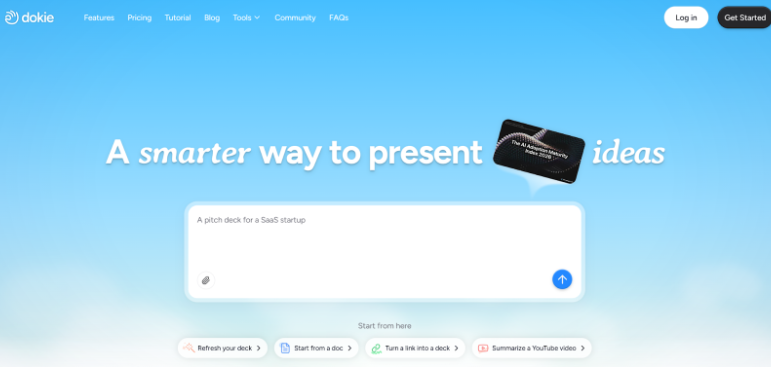
Dokie AI is an AI presentation maker built to turn raw content into slides. Instead of starting with a blank deck, users can begin with a topic, notes, a document, or other source materials and let the tool create a draft presentation. That already makes it appealing to people who build slides often, especially in business settings where speed matters.
At a basic level, Dokie works as an AI PPT maker and AI slides generator. But what makes it more interesting is that it is not only a prompt-to-slide tool. It also supports several content conversion workflows, which makes it more practical for real work. Users can convert materials through features like PDF to Slides, Word to Slides, Text to Slides, Excel to Slides, JPG to Slides, PNG to Slides, HTML to Slides, and DOC to Slides.
That matters because most presentations do not begin with a blank idea. They usually begin with files, notes, reports, screenshots, or drafts. Dokie AI seems designed around that reality.
Why Many AI Presentation Tools Still Fall Short
To understand where Dokie fits, it helps to look at the main problem with many AI presentation tools.
A lot of AI slide products are good at generating something quickly. But quick output does not always mean useful output. In many cases, the deck looks fine at first glance, but the structure is weak, the content feels generic, and the user still has to spend a long time reorganizing slides or rewriting points.
For business decks, this becomes a bigger issue. A business presentation usually needs a clear flow. It should explain the background, present the main points, support them with data or examples, and end with a clear conclusion or next step. If the AI cannot build that structure well, the user saves very little time.
That is where Dokie AI has an advantage. Its strongest point is not that it can generate slides at all. Many tools can do that. Its stronger value is that it tries to turn existing materials into a more usable presentation workflow.
How Dokie AI Works
The workflow is simple, which is one reason the tool is easy to understand.
A user starts by providing source content. This might be a short text prompt, rough notes, a PDF report, a Word document, a spreadsheet, or even images. Dokie AI then uses that content to build a slide deck. The goal is not just to place text on slides, but to organize the material into a more structured presentation.
This is important. In many slide workflows, the hardest part is not formatting. It is deciding what to include, how to group the information, and what order the slides should follow. If the tool can handle that early part well, it can save a lot of time.
After generating the deck, the user can edit and refine it. This is exactly how most professionals want to work. Very few people want AI to finish the whole presentation without review. What they want is a strong first draft that cuts down the hardest parts of the process.
The Biggest Strength: Content-to-Slides Workflow
The most useful part of Dokie AI is that it feels built around real work instead of only AI novelty.
The “to Slides” functions are especially important here. Many professionals already have the raw materials for a presentation. They may have a campaign report in PDF format, a strategy draft in Word, notes in plain text, a spreadsheet with performance data, or screenshots of charts and examples. The problem is not lack of information. The problem is turning that information into a presentation quickly.
Dokie’s features directly target that problem.
PDF to Slides is useful for turning reports, research summaries, and meeting materials into decks.
Word to Slides helps convert written plans, proposals, and briefs into presentation format.
Text to Slides works well for rough notes, bullet points, and fast outlines.
Excel to Slides is valuable for reporting workflows and performance reviews.
JPG to Slides and PNG to Slides help with visual materials such as screenshots, charts, and creatives.
HTML to Slides is useful for turning web content, landing pages, or online materials into presentation drafts.
DOC to Slides adds more flexibility for users working with older or varied document formats.
This is one of the clearest reasons Dokie AI stands out. It feels more like a bridge between business content and presentations.
Dokie AI for Business Use
Dokie AI is especially strong for business users because business presentations usually follow repeatable patterns. A weekly report, a client recap, a campaign update, or a strategy deck all need clarity and structure. The design matters, but structure matters more.
That is why Dokie fits so well in business workflows. Instead of only helping users decorate slides, it helps them move from raw materials to a usable draft. This can be helpful for marketers, consultants, founders, product teams, operations teams, and sales teams.
For example, a marketer might use Excel to Slides to start from performance data, then use JPG to Slides for ad screenshots, and finally build a clear campaign review deck. A consultant might start with a Word brief and turn it into a structured presentation for a client. A founder might use Text to Slides or PDF to Slides to create an investor update or business review.
In these situations, Dokie AI is not just an AI slides generator. It becomes a practical work tool.
Output Quality
No AI presentation tool is perfect, and Dokie AI is not an exception. It still works best as a draft generator rather than a final answer machine. Users should expect to edit the deck, refine the message, and check the details.
That said, the quality of the output appears stronger when the source material is strong. This is actually a good sign. Instead of pretending to invent everything from nothing, Dokie seems best when it helps shape and organize existing information. In business use, that is usually what users need.
The slides tend to feel more practical than overly flashy. That is a plus for real presentations. Many professionals do not need a deck that looks experimental. They need one that is clear, professional, and easy to present.
Ease of Use
One of Dokie AI’s strengths is that the value proposition is easy to understand. Users do not need to spend a lot of time learning a totally new idea. The logic is simple: take content you already have and turn it into slides faster.
That makes adoption easier, especially for teams that are not looking for a highly creative design platform. The interface and workflow seem better suited to users who care about getting work done instead of exploring design-heavy features.
This also makes Dokie a good fit for people who make presentations regularly. Once the workflow becomes familiar, it can save time across repeated tasks.
Pros of Dokie AI
Dokie AI has a few clear strengths.
First, it is practical. The tool matches the way people actually create presentations in business settings. Most users already have content. They need help turning it into slides, and Dokie directly supports that need.
Second, the range of “to Slides” features is a real advantage. Supporting PDF, Word, Text, Excel, JPG, PNG, HTML, and DOC inputs makes the product more flexible than a simple prompt-based AI PPT maker.
Third, it appears stronger on structure than many tools that focus mostly on visual presentation. This matters because structure is often the hardest part of slide creation.
Fourth, it can save real time. Not just because AI is faster, but because it reduces the need to rebuild materials manually.
Cons of Dokie AI
The main weakness is that it still needs human review, like almost every AI presentation maker. Users should not expect perfect messaging, perfect data interpretation, or a final deck with no changes needed.
It may also feel less ideal for users whose main goal is highly custom visual design. Dokie seems more workflow-focused than design-first. That is good for many business users, but not for everyone.
Finally, the final quality depends a lot on the quality of the input. Better source material usually means better output. That is not unique to Dokie, but it is worth noting.
Dokie AI vs Other AI Presentation Makers
Compared with many AI presentation makers, Dokie AI feels more workflow-first.
Some tools are stronger on web-style storytelling. Some are stronger on visual polish. Some are mainly useful because they sit inside PowerPoint or Google Slides. Dokie’s position is different. Its edge is that it helps users turn business materials into structured slides through multiple input formats.
That makes it especially appealing for people who already have reports, docs, data, and visuals and want to move faster. In other words, Dokie is not only competing as an AI PPT maker. It is also competing as a business productivity tool for deck creation.
Is Dokie AI Worth It?
For users who create presentations often, especially in business settings, Dokie AI has a strong case.
Its value is not only in AI generation. It is in helping users avoid manual rebuilding work. If your normal workflow involves turning PDFs, Word files, notes, spreadsheets, screenshots, or web materials into decks, Dokie saves time in a very direct way.
If your top priority is creative design freedom, there may be other tools that fit better. But if your main goal is to create clear, usable business slides faster, Dokie AI is one of the more practical options available.
Final Verdict
Dokie AI is a useful AI presentation maker because it focuses on a real problem: turning existing materials into better slide decks with less work. Its support for PDF to Slides, Word to Slides, Text to Slides, Excel to Slides, JPG to Slides, PNG to Slides, HTML to Slides, and DOC to Slides makes it feel more practical than many basic AI slides generators.
It is not just another tool that creates slides from a prompt. It is a workflow-focused AI PPT maker built for people who already have content and need to present it better. For business users, that makes Dokie AI a strong option and a review-worthy tool in a crowded market.
FAQs
What is Dokie AI best for?
Dokie AI is best for business users who need to turn existing materials into presentations. It works well for reports, client decks, strategy slides, and other practical business use cases.
What file types can Dokie AI turn into slides?
Dokie AI supports PDF to Slides, Word to Slides, Text to Slides, Excel to Slides, JPG to Slides, PNG to Slides, HTML to Slides, and DOC to Slides.
Is Dokie AI better than a basic AI slides generator?
For users who already have source materials, yes. Dokie AI is more useful than a basic AI slides generator because it supports multiple content-to-slides workflows instead of relying only on prompts.
Does Dokie AI still need editing?
Yes. Like most AI presentation makers, it works best as a strong first draft tool. Users should still review, refine, and polish the final presentation.

